Key Revocation Report
The Key Revocation Report allows users to track the reservations for which the physical or digital keys are revoked.
Perform the following steps to generate the report:
Navigate to Reports ➜ Dynamic Reports ➜ Guests/Reservations ➜ Key Revocation.
Refer to the following table and fill in the fields.
|
Field |
Description |
|---|---|
|
Report Name |
Key Revocation |
|
Start Date |
The date from which the report should be generated. It is a mandatory field that allows users to choose any past date up to the current property date. |
|
End Date |
The date up to which the report should be generated. It is a mandatory field that allows users to choose any past date up to the current property date. |
|
Property |
Displays the name of the current property. It is a single-select drop-down list that displays all the properties under the tenant. |
|
Building |
It is a multi-select drop-down list that displays all the buildings in the property. By default, all the buildings in the property are selected. |
|
Floor |
It is a multi-select drop-down list that displays all the floors in the property. By default, all the floors in the property are selected. |
Click Run to generate the report.
Click Save to save the report under User Favorites section.
Sample Report
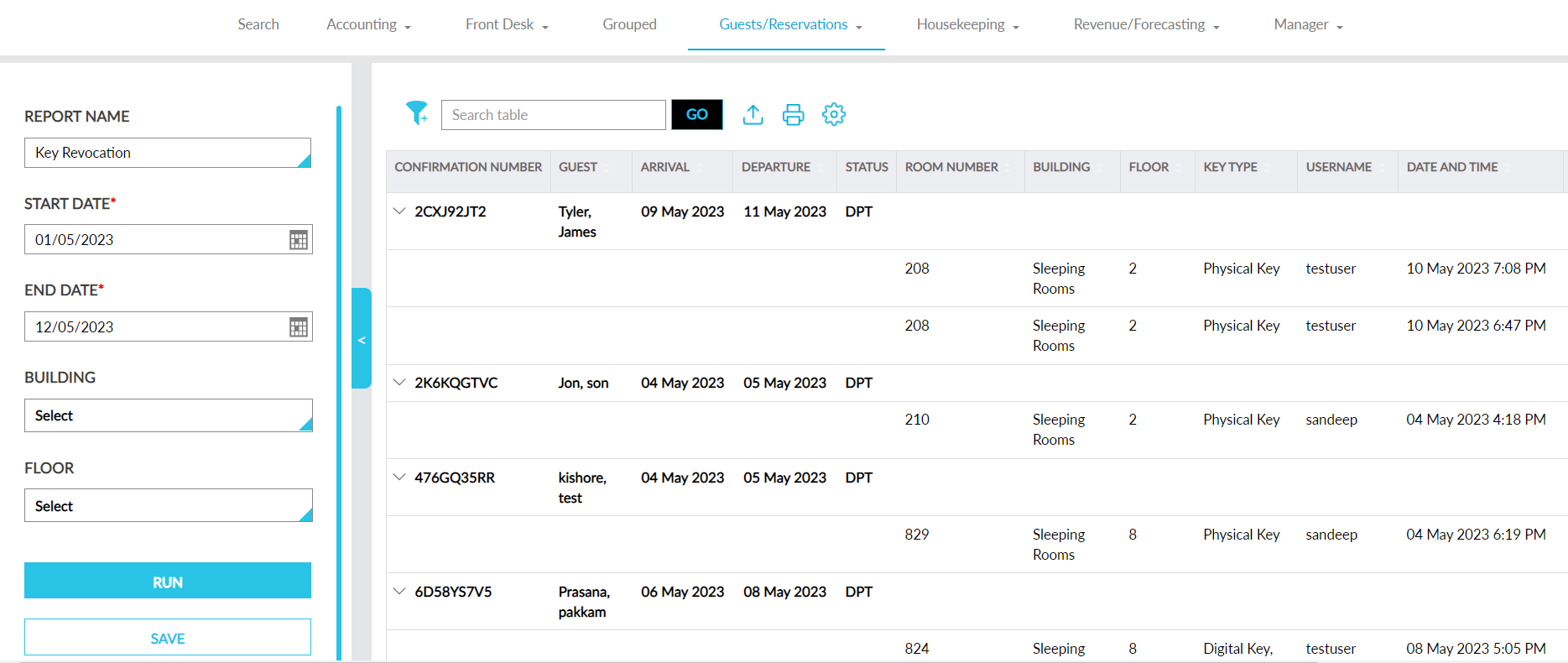
Report Fields
This report displays the following fields:
|
Field |
Description |
|---|---|
|
Confirmation Number |
Displays the confirmation number of the reservation for which the key has been revoked. |
|
Third-Party Confirmation |
The third-party confirmation number for the reservation if available. |
|
Guest |
Displays the guest name associated with the reservation for which the key has been revoked. |
|
Arrival |
Displays the arrival date of the reservation for which the key has been revoked. |
|
Departure |
Displays the departure date of the reservation for which the key has been revoked. |
|
Status |
Displays the status code of the reservation for which the key has been revoked. |
|
Room Number |
Displays the room number of the reservation for which the key has been revoked. |
|
Building |
Displays the building in which the room is present. |
|
Floor |
Displays the floor in which the room is present. |
|
Key Type |
Displays the type of key that is revoked for the reservation. When both physical and digital keys are revoked, they are displayed in the following format: Physical Key, Digital Key. |
|
Username |
Displays the username of the user who revoked the keys. |
|
Date and Time |
Displays the date and time when the keys were revoked. |
|
Reason |
Displays the reason entered by the user when revoking the key. |